Working with the AppInstalled and AppUninstalling events in SharePoint Apps

Some quick notes about remote app events receivers I have picked up when working with apps in SharePoint Online.

When is AppInstalled triggered?

When you add an app in SharePoint Online it shows in Site Content as being added. Installing an app in itself is nothing special, so you might expect the AppInstalled event to trigger pretty much instantly, but not so. There appears to be some kind of queue system employed here. Usually the queue is short and the app installs quickly, but sometimes I have had to wait for several minutes before the installation started.

AppInstalled can be triggered several times

If your app needs to deploy a number of items to the host web it may take a while to complete the installation. Other times your installer could be slow because the server is under heavy load or you are debugging. Even if your app is still up and running and performing the installation and thus communicating with SharePoint, if it does not complete the installation within a certain timespan SharePoint will think that the installation failed and try again. SharePoint retries up to four times by design. How long is this timespan you ask? It varies. Usually I see retries in about 15-30 seconds in my logs. But it is unpredictable and sometimes it seems to retry in as short as a few seconds. As an example, here is an extract from a log session in one of my apps:

There does not seem to be a way to tell SharePoint that your installation will take time and ask it to be patient, so you need to handle these retries in some way. You should start by building a robust installer that can handle situations when elements are already installed. This is always a good thing, but not enought for the above stated problem, because there could be a race condition: how would you know if another thread has not just begun installing the element your thread wants to install?

Another way could be to let your server threads communicate with each other, as suggested by AkhileshN. If the first call is still running, subsequent calls could halt or return directly. I tried this and it works, but you run into another problem. The first call will either succeed or fail. The subsequent calls can not simply return success, since SharePoint will think that install succeeded even if the first call later returns failure. And how do you know that SharePoint is still listening to the first call? This can quickly become hard to manage. Myself I decided not to use this approach.

My solution was to only perform a few basic tasks in the AppInstalled event. I mostly put validation checks there to make sure that it is ok to install the app on the specific host web. Then the user will have to open up the app and complete the installation from there. Sometimes I do provision a few elements in the AppInstalled event though, since this will improve the user experience. Just make sure you know what you are doing and test thoroughly so you understand what is happening.

AppUninstalling event does not trigger?

If you’ve tried to listen to the AppUninstalling event in your SharePoint app but never gotten it to fire you’re probably not alone. The AppInstalled event is triggered when you add the app in Site Content, so you’d expect AppUninstalling to be triggered when the app is removed from there. Not so, and here is why: When you remove an app it is placed in the Recycle Bin, so you have to remove it from there too. But AppUninstalling will still not trigger! If you go to Site Settings > Site Collection Administration > Recycle Bin you will see that you actually have two recycle bins. “End user Recycle Bin items” is the one you previously emptied. But there is also “Deleted from end user Recycle Bin”. Open this and you’ll find your “deleted” apps here. Empty this recycle bin too, and now the AppUninstalling event should trigger!

In SharePoint you have two recycle bins!

In SharePoint you have two recycle bins!

Posted in Development | Tagged , , , | 3 Comments

Walkthrough for Animaniacs: Lights, Camera, Action!

When I worked on the GameBoy Advance title Animaniacs: Lights, Camera, Action! we also put together an official walkthrough for the game. The game was however severely delayed, and the walkthrough was forgotten and never publicly released. I found it on my hard drive the other day and though it deserves to be released as intended.

lca_walkthoughDownload the walkthrough

I thought I could also share some more or less interesting trivia about the walkthrough and the development of the game.

  • The walkthrough contains many concept art drawing by Dennis Gustafsson that have never been seen outside the development team.
  • When playing the game you only see a small portion of the map. It’s hard to get the full picture. But the walkthrough shows all maps in the full size! These maps were generated by the level editor we used.
  • Speaking about the level editor, it was custom built for this game by one of the developers, Ola Zandelin. It was later re-used for another isometric game called Looney Tunes: Back in Action. (This game was actually released two years before Animaniacs, which was delayed due to publishing problems).
  • In the walkthrough, all objects and enemies you see are placed on their starting positions. You can also see some objects that are hidden in the real game, but in the editor show up as pink squares. What you don’t see are all the nodes and paths connecting the nodes that we used to control the movements of sprites and other objects, as seen in this screenshot:
lca_level_editor

A typical scene in the level editor. Yellow lines show enemy patterns. Purple boxes initiate events and release enemies & items when the player enters them.

lca_level_editor-04

The same scene without graphics layers, showing the height data. The pillars are used to “paint” the trees on so they appear in front of the sprites.

  • If you look closely at the screenshot you can see that some sprites actually show in front of high backgrounds structures such as trees and walls. Why is that? Well, the game is isometric, a form of pseudo 3D. In order to pull this off on a GBA we took advantage of the hardware layers it offered. These layer could be sorted on top of each other. So walls etc were actually drawn on different layers allowing you to walk behind them. Clever, but not without its problems. For examples, such walls could not overlap, and the background artists needed to pay attention to what layer they worked on or else the sprites would be displayed in front of the wall instead of behind.
  • Between levels in the game you see cutscenes progressing the story, and before each level you also see a “movie poster” for the next level. These all look like images, but actually are not. Instead they is simply a tiny “levels” created with the editor and using the same sprites and graphics as the rest of the game. Besides a convenient way to crate these cutscenes, it also saved us a lot of memory.
The "posters" for the three movies in the game's plot

The “posters” for the three movies in the game’s plot

  • My part in the development team was to place all sprites and create their behaviors. Normally you would use a programming language to do this, but the level editor had a built in scripting tool where I could build behaviors using various pre-programmed actions and states that the script jumped between. It was a very fast and creative way to “program” the enemy behaviors.
lca_script_editor

Enemy scripting

  • The game was released on both GameBoy Advance and GameBoy DS. The DS version does not utilize the extra screen for anything useful though. This is because the this version was an afterthought. The game was developed purely for the GBA, before the DS even existed. It was finished, but due to publishing problems it was never released. Two years later, the game was picked up by another publisher, who hired some other developer to port it to the DS as well.
  • We had a requirement to squeeze the game into a 4MB cartridge. It took a lot of really hard work to achieve this, both with compression algorithms and manual optimizations of content. In the end however, it was released in an 8MB cartride for some reason. Sigh…

Animaniacs: Lights, Camera, Action! did not receive much praise when released. While not the best game ever made, I still think it deserves to be noticed. The plot and dialog is wacky. Graphics and scenery is full of tiny details if you look closely. The maps are big and coherent, and contain lots of hidden areas with bonus items. In all it’s not a bad game. Just not excellent either.

Finally, let me share an unused sprite from the development archives. The idea was to have a “fun-meter”, indicated by a face. It cracks me up every time I see it!

lca_laughing_face

Posted in Games | Tagged , , , , , , , , , , | 3 Comments

Introducing DynForm, a c# library for semi-automatic WinForms dialogs

Application development often involves creating dialogs where the user is presented a form to enter or edit some sort of data. DynForm aims to make development of this a little bit easier. By implementing a simple interface into your data entities, the DynForm library will be able to semi-automatically build a form and display it to the user to fill in.

Update: You can watch an introduction video to DynForm here, courtesy of Kyle Pew at Webucator.

Source Code

You can download the DynForm source code from GitHub. A sample application is included, showing how to use most features. Everything is written in c#. Both the sample and library code is well documented. It is released as open source, licensed with GPL3.

Screenshots

Here are some example screenshots of what DynForm dialogs can look like (taken from a real application):
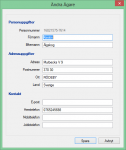
dynform3

A typical form for editing person details.

dynform2

When selecting items to add to a list, a separate dialog with filtering options is shown.

dynform1

DynForm can validate data and display both errors and warnings to the user.

How to use

Lets say you have a dog entity class:

First add the DynForm namespace to your class. Then add the IDynFormEntity interface and the methods required by this interface:

DynForm is not fully automatic, so you have to tell it what to show in the form. My goal was to make it fast and easy to use, yet still let the developer be in charge of the design. Modify the  SetupFormFields() method as such:

You also need to make sure the data is valid. Modify the Validate() method like this:

That’s really all you need to do in the entity class itself! Now you are ready to display the form. Add this code, for example in a button press event:

The result looks like this (notice that it does not allow you to save the form, since the name field does not validate):

dynform_example

As you can see, with relatively little code you can easily create forms for a multitude of data entities.

Available Controls

DynForm supports many input controls out of the box:

  • Textbox
  • Masked textbox
  • Checkbox
  • Number spinner
  • Date input
  • Labels & headers
  • Dropdown list
  • Listbox

Listboxes are used for more complex situation. Here the user can add and remove items based on a seprate list of available items. Listboxes can additionally have checkboxes, dropdown lists and text fields associated with each item.

Posted in Development | Tagged , , , , , , | Leave a comment

The “secret” Windows 8.1 menu for power users

Windows 8 is still new to me, and I’m quite frustrated every time I need to use it because seems to try its best to hide all the useful settings and features from me, and search insists on promoting Metro settings which are pretty much useless. Today I discovered a great little shortcut though. In Windows 8.1, if you right click on the start button, a menu will appear. Here you can find shortcuts to the control panel, disk management, command prompt and other places that power users need quick access to. Neat! :-)

windows_81_start_button_menu


Posted in Tips | Tagged , , , | 3 Comments

Opening CSV files in Excel

CSV (Comma Separated Values) is a useful file format for tabular data that I often use. But every time I want to load a CSV file into Excel it does not seem to recognize the files. Usually it just loads the entire file into a single column. Irritating, but now I finally figured out why!

It turns out the deliminator used to separate the columns in a CSV is determined by the localization settings in Windows. On my system, even though my Windows is English, my locale is set to Swedish. In this locale, the “List Separator” is not comma, it’s semicolon. So Excel will look for semicolons instead of commas, and simply not recognize the commas in the CSV as column deliminators. (I don’t know why you would want localization to affect a file format. It seems odd to change how a file format works based on locale. But that’s Microsoft for you…)

Ok, so how do you fix this then? Here are some solutions I’ve figured out that all work with my Excel 2010 on Windows 7:

  • I’ve found that if you change the file extension from .csv to .xls and then open the file in Excel, it will first warn you that the file may be corrupt, but then show a dialog allowing you to load the file and manually set the delimiter. Note that the extension should be .xls (not .xlsx) and that you must open the file from inside Excel (i.e. do not double click the file to open it).
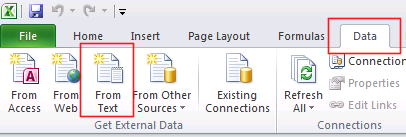
  • excel_import_csv_text_dataIt is also possible to import the CSV data into Excel. Start Excel and make sure that you have an open workbook. Then go to the Data tab on the ribbon and select From Text. Now you can open the CSV  and a dialog will show where you can select what deliminator to use. Finally you get to paste the imported data into your spreadsheet.
  • Of course you can always modify the CSV file and replace the commas with the character prescribed by the system settings. This can easily be done using the Replace All function found in most Text editors, such as Notepad2.
  • list_separator_settingsA more permanent solution is to change the list separator in your regional settings: Control panel -> Region and Language -> Formats tab -> Additional Settings -> List separator. Note that this will affect all applications using the localized settings. I don’t know where else this deliminator is used.
  • excel_single_column_to_multipleFinally, if you already have a CSV file that Excel loaded as a single column, you can tell Excel to split this data into multiple columns like this: Select the column with the data by clicking on the column header. Next go to the Data tab in the ribbon and click Text to Columns. In the dialog that appears, select your delimiter and complete the wizard.
As you can see there are many way to get around the problem. I find that each has its pros and cons, and you have pick the solution that works best for your situation.

Posted in Tutorials | Tagged , , , , , , | 5 Comments

Stereo Mix does not record any sound when using a USB headset

I want to share a problem that I stumbled on recently. I was helping my mother setting up her computer to allow for recording audio through stereo mix. Stereo Mix is a virtual recording device that allows you to record all sound currently being played on the computer, sort of what-you-hear-is-what-you-get. I got it working and was able to record the sound without problems. Fast forward to the next day, and I continue working with the computer. But this time the sound I recorded was just silent! Even though stereo mix was selected as input device and all other settings were the same, it no longer recorded anything.

The problem turned out to be this: When I set up the stereo mix I had used my own headphones. These are normal headphones with a classic stereo plug. The second time though, I plugged in my mother’s headset instead. This is a headset that is connected to the computer via the USB-port. And this was the problem. As soon as they were connected, no sound was recorded. Unplugging them solved the problem!

A thread on Superuser points towards an explanation: Stereo mix can only record audio that travels through the internal sound card. I suspect the USB headphones act as sound card, and thus the sound travels directly to them instead. So even though the stereo mix actually works, there is no sound flowing through the device to record.

Posted in Tips | Tagged , , , , | 1 Comment

Sega Game Brochure Scans 1989-1991

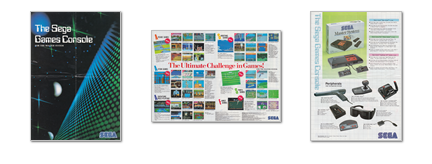
In a previous post I shared scans from my collection of old Swedish Nintendo game ads, brochures, pamphlets and posters. In addition to these, I also had some brochures from Sega that I have now scanned and uploaded. Two of   these are Swedish, one is in English, Spanish, German and French. For me these brochure trigger a lot of nostalgic emotions. I hope you like the too!


Master System 1989

Master System 1989

Download Sega Reklamblad – Master System 1989.pdf

Master System 1990

Master System 1990

Download Sega Reklamblad – Master System 1990.pdf

Megadrive, Master System & Gamegear 1991

Megadrive, Master System & Gamegear 1991

Download Sega Reklamblad – Megadrive, Master System & Gamegear 1991.pdf

Posted in Games | Tagged , , , , , , , , | 4 Comments

Swedish Nintendo Brochure Scans 1988-1993

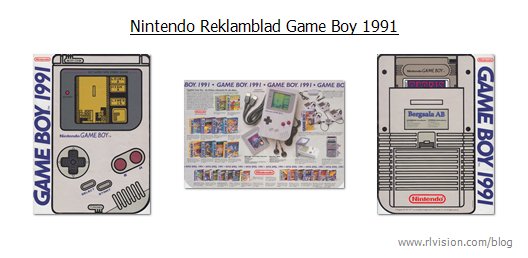
During the late 80’s and yearly 90’s Bergsala, the official distributor of Nintendo products in Sweden published yearly games brochures, leaflets and other promotional items. I still have some of these, and decided to scan them and share. For me, who grew up with the NES, these trigger some seriours nostagic feelings. Even though they are in Swedish, I hope many other will enjoy them too!

(Click an image for a thumbnail preview of all pages. Click the download link to get the full PDF.)


NES 1988-1993

Yearly brochures listing games for the Nintendo Entertainment System.

Nintendo Reklamblad NES 1988-Preview

Download “Nintendo Reklamblad NES 1988.pdf”

Nintendo Reklamblad NES 1989-Preview

Download “Nintendo Reklamblad NES 1989.pdf”

Nintendo Reklamblad NES 1990-Preview

Download “Nintendo Reklamblad NES 1990.pdf”

Nintendo Reklamblad NES 1991-Preview

Download “Nintendo Reklamblad NES 1991.pdf”

Nintendo Reklamblad NES 1992-Preview

Download “Nintendo Reklamblad NES 1992.pdf”

Nintendo Reklamblad NES 1993-Preview

Download “Nintendo Reklamblad NES 1993.pdf”


NES game pak pamphlet SCN-GP-2

This appears to have been a pamphlet included in some game boxes.

Nintendo Medföljande Reklam NES SCN-GP-2-Preview

Download “Nintendo Medföljande Reklam NES SCN-GP-2.pdf”


Nintendo Poster from 1989

One of my favourites. I don’t know where this poster comes from, but it say © Bergsala AB, the official Swedish distributor for Nintendo products, so it might be custom made for them. The artist’s signature is “Rost”.

NES-Poster-Preview

Download “Nintendo Poster 1989.jpg”


Game Boy 1990-1993

Yearly Game Boy brochures

Nintendo Reklamblad Game Boy 1990-Preview

Download “Nintendo Reklamblad Game Boy 1990.pdf”

Nintendo Reklamblad Game Boy 1991-Preview

Download “Nintendo Reklamblad Game Boy 1991.pdf”

Nintendo Reklamblad Game Boy 1992-Preview

Download “Nintendo Reklamblad Game Boy 1992.pdf”

Nintendo Reklamblad Game Boy 1993-Preview

Download “Nintendo Reklamblad Game Boy 1993.pdf”


Super NES 1992-1993

Yearly Super Nintendo games brochures

Nintendo Reklamblad Super NES 1992-Preview

Download “Nintendo Reklamblad Super NES 1992.pdf”

Nintendo Reklamblad Super NES 1993-Preview

Download “Nintendo Reklamblad Super NES 1993.pdf”


Nintendo Spelguide 1992-1993

These brochures lists all games officially published by Nintendo in Sweden. Games are listed with description, power meter and screenshot. The first brochure one even contains technical information about what chipset the games had. Personally I find these highly satisfying to browse.

Nintendo Spelguide 1992-Preview

Download “Nintendo Spelguide 1992.pdf”

Nintendo Spelguide 1993-Preview

Download “Nintendo Spelguide 1993.pdf”


Nintendo Videospelklubb Nr. 12-14 1990

Nintendo Videospelklubb was the official club for Nintendo owners in Sweden. Membership was free and you got a cool plastic card with you unique membership number. They also published a newsletter with general information, new games, tips & tricks, competitions etc. Here are three issues of their newsletter:

Nintendo Videospelklubb Nr 12 Jan 1990-Preview

Download “Nintendo Videospelklubb Nr. 12 Jan 1990.pdf”

Nintendo Videospelklubb Nr 13 Mars 1990-Preview

Download “Nintendo Videospelklubb Nr. 13 Mars 1990.pdf”

Nintendo Videospelklubb Nr 14 Maj 1990-Preview

Download “Nintendo Videospelklubb Nr. 14 Maj 1990.pdf”

Posted in Games | Tagged , , , , , , , , , , , | 5 Comments

Authentication with Passwords & Passphrases: Implications on Usability and Security

The following text is a summary of an academic report I wrote together with a friend as part of a course on computer security at Lund University. The paper was graded “A” by the teacher. You can download and read the full report here: Authentication with Passwords & Passphrases – Implications on Usability and Security.pdf

Introduction

A passphrase is a form of password, where several natural language words are used instead of a shorter random sequence of characters. Most password systems can handle passphrases too, making the choice a matter of policy. We sought to explore the implications on usability and security when using passwords and passphrases as an authentication method for information systems.  Our objectives were to see how passphrases relate to passwords and how they each affect security and usability, and how security and usability affect each other.

Security

Passwords and passphrases (“secrets”) can be generated by the system or chosen by the user. User selected secrets tend to be less secure secrets and predictable in various ways. A security meter can help users choose a stronger secret. System generated secrets are generally more secure, but have less usability.

Attackers can compromise secrets in many ways. Offline brute force and dictionary attacks can crack even complex secrets today. Online systems are less vulnerable to such attacks, but through social engineering an attacker can compromise these too. There is no conclusive evidence that either passwords or passphrases offer better security than the other. They both have weaknesses that can be exploited, so their security depends on the composition and length, as well as the type of attack. Long secrets using made up words can protect against offline attacks, but not against social engineering, for which user awareness, attitude and education is essential.

Usability

Memory and typographical errors are the errors affecting usability the most when it comes to secrets. Users are more likely to enter passphrases wrong due to their sheer length.  This difference tends to disappear as the users get more comfortable using passphrases. There is no evidence that user selected passphrases are easier to remember than user selected passwords. User selected secrets are however easier to remember than system generated secrets. Users also prefer to select their secrets themselves rather than being assigned system generated ones.

Password Security vs UsabilityHuman Factor

There is an apparent trade-off between usability and strong security, where techniques to increase security tend to decrease the usability and vice versa (figure 1). When the usability is affected negatively by security policies, users may bypass or try to trick the system’s control mechanisms to achieve higher usability. Often users only see authentication as an obstacle that needs to be bypassed to get to the desired information. An example of this can be when users are aware of the security policies but tries to figure out the weakest secret that still complies with the policy when required to changed their password. The secret may comply technically, but the intentions of the policy are lost.

When users bypass security policies they often don’t have a clear understanding of the potential risks they expose the system to. This risk is too abstract for the users to care about, while the authentication barrier they want to overcome is real. Policy makers must thus find a balance that takes into account the security requirements for the systems as well as user satisfaction.

Result

In conclusion, neither passwords nor passphrases offered a big enough benefit to be recommended in front of the other. Many factors affects usability and security. The two tend to be inversely related – improving one impairs the other. Practitioners need to consider both to find a suitable balance for their particular systems. When defining security policies, it is better to design policies that are actually used, rather than something too strict that is circumvented by the users.

Posted in Articles | Tagged , , , | Leave a comment

Get a zero-installation SQL database for learning or dabbling

Database Management Systems typically require big installations and configuration to get running. I’ve always found this to be a major threshold for working with databases, especially if you only want to test some simple queries or if you are learning SQL and something to fiddle around with.

SQLite is a database engine intended for embedding in application. For example, the Firefox uses it to store internal data. It does not require installation and the database is contained in a single file. Here I will present two free database managements tools that lets you work against a SQLite database file, similar to tools like Microsoft SQL Server Management Studio. I’ve found these quite useful for learning and testing how SQL works in various situations.

sqlitespy

SQLiteSpy

SQLiteSpy is a tiny application that offers a tabbed interface with two panes in each tab, one for your query and one for the result. I really like this litte app. It’s fast and easy to work with, but pretty much everything is done by running SQL queries, so you need to know your CREATE commands if you want to make your own database. It does however includes a useful database called World.db3 that is perfect for testing SELECT queries against! Another cool feature is the fact that if you just issue a CREATE TABLE statement without first creating a new database, the new table ends up in the “main” database, which is not save on disk and only exists in memory until you close the program.

sqliteadmin

SQLite Admin

SQLite Admin is a more advanced utility. Besides running queries, it offers a graphical interface for creating and editing tables, triggers, views and indexes, as well as editing the table data. Other features include code completion, an import feature and generating create statements for a database object. The GUI is however sometime quirky and slow. Also, the developer does not seem to update the program anymore.

For designing a database, SQLite Admin is a better choice thanks to its graphical interface, but after that I prefer the speed and simplicity of SQLiteSpy when running queries. All the extra features in SQLite Admin sure are nice, but if you are into learning SQL this kind of defeats the purpose. (Tip: When you save your database in SQLite Admin it gets a “s3db” file extension. SQLiteSpy only looks for db3 files when opening files. But it can still read the s3db files: Either rename .s3db to .db3, or have the SQLiteSpy open dialog box simply list all files.)

Both of these apps are delivered as zip-files – just unzip and run! SQLiteSpy is fully portable. Unfortunately SQLite Admin writes its settings in the AppData system folder. Since databases are saved as a single files they can easily be sent to for example a study buddy. Or just save both program and your databases on a USB stick and bring with you!

Posted in Software | Tagged , , , , | 1 Comment